
Reference guide
Meccha Chameleon Controls
The control scheme is keyboard-and-mouse, organized around five groups of actions — and the honest note up front: exact default keys change with patches, so the in-game settings menu is the source of truth. This page teaches you the layout's logic, what to check before your first lobby, and which defaults veterans rebind.
The Five Control Groups
| Group | What lives there |
|---|---|
| Movement & camera | Standard PC movement plus camera control — your scan speed as Seeker lives here |
| Paint mode | Toggling the painting interface: palette, brush size and application |
| Color sampling | Picking colors directly from surfaces — the single most-used action in prep phase |
| Poses | Locking body positions so your silhouette matches the story your spot tells |
| Social & lobby | Chat, ping and lobby controls for coordinating (or gloating) |
Exact default keys: verify in-game (Settings → Controls) — a patch-accurate key table will be published here once verified against the current build.
The Community-Documented Key Table
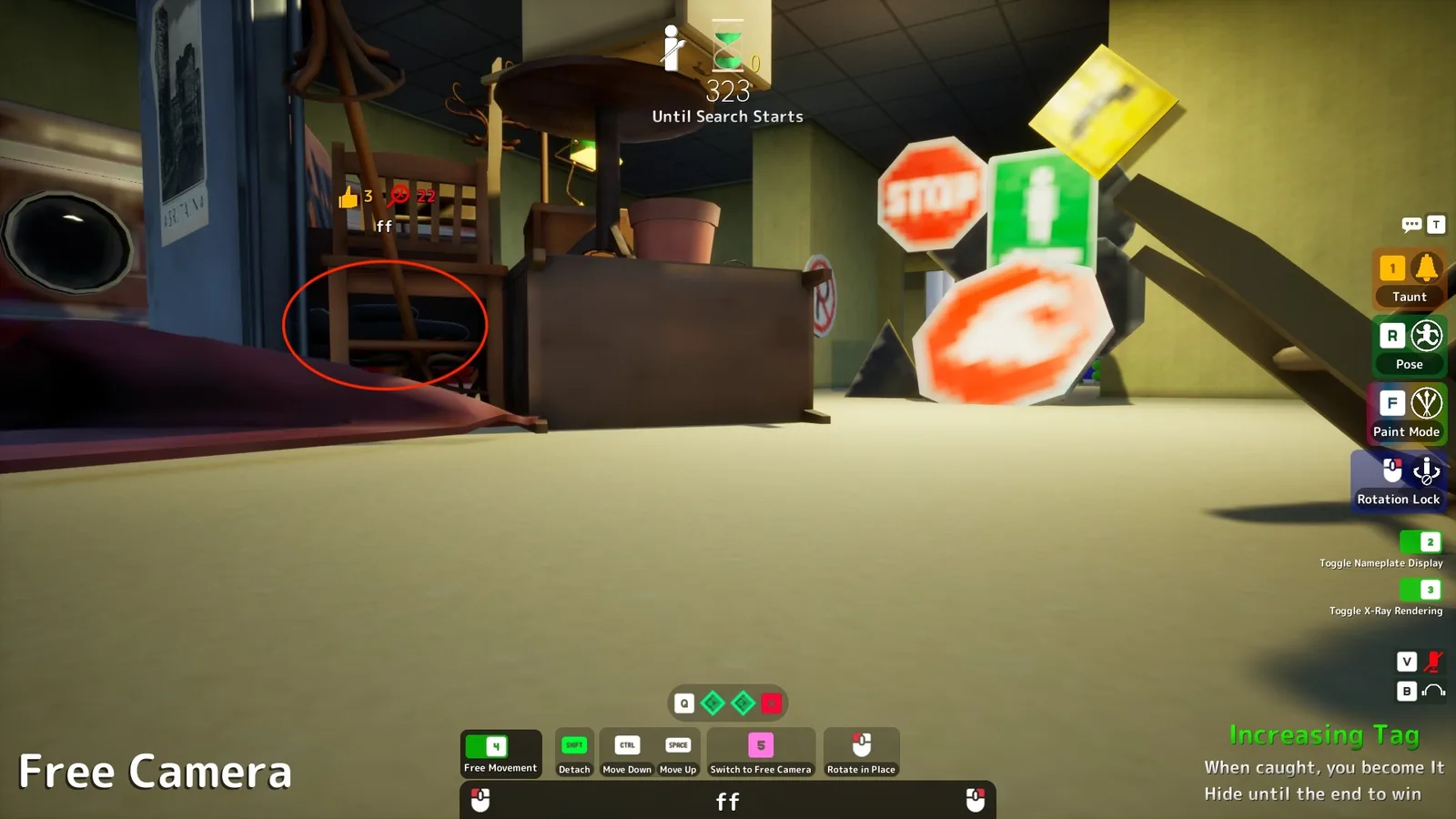
Most rows below are now verified against the live game (2026-07-03 captures — see the HUD screenshot); the shoot and brush-size rows remain community-documented. Still treat the table as the map, not the territory: patches can move keys, so Settings → Controls in-game stays the final word. Community-documented, cross-referenced, last checked 2026-07-03.
| Action | Key | Context |
|---|---|---|
| Move | WASD | Both roles |
| Taunt | 1 | Verified in-game |
| Climb | Space | On ground, verified in-game |
| Free camera / free movement | 5 / 4 | Prep phase, verified in-game |
| Open paint mode | F | Hider prep |
| 3D color eyedropper | Space | In paint mode |
| Brush size | Hold right-click + drag | In paint mode |
| Rotate body while painting | Middle mouse button | In paint mode |
| Pose menu / lock pose | R | Hider |
| Toggle falling shadow | V | In paint mode only — verified in-game |
| Microphone mute toggle | V | Outside paint mode, same key — verified in-game |
| Audio toggle | B | HUD headphone icon — function inferred, verify |
| Wall-stick: raise / lower | Space / Ctrl | While attached to a surface |
| Release from surface | Shift | While attached |
| Rotation / rotate-in-place | Hold right-click (drifting) | Reworked across patches 2.3.1–2.3.2 — check in-game |
| Toggle nameplate display | 2 | Verified in-game |
| Toggle X-Ray Rendering | 3 | Official label, verified in-game |
| Shoot to confirm | Left-click | Seeker — misses cost health |
Two Minutes in Settings Before Your First Lobby
Open the controls menu before matchmaking, and walk it with three questions. Can your fingers reach the paint-mode toggle without leaving movement keys? You will be flipping in and out of painting under time pressure, and a stretch that costs half a second per flip costs you the prep phase. Is color sampling on a button you can hold or tap comfortably alongside mouse movement? Sampling-then-painting is a rapid alternation, not two separate ceremonies. And do the pose keys sit where panic can find them? When a Seeker rounds the corner, you will not have time to remember an awkward bind — muscle memory or nothing.
If any answer is no, rebind now. There is no meta-approved layout to copy; there is only whether your hands agree with your bindings, and two minutes in an empty menu is the cheapest practice you will ever get — far cheaper than discovering the problem mid-sweep with a Seeker two meters away.
Input Habits That Actually Win Rounds
Hardware first: any mouse beats a trackpad by a margin that decides rounds — painting accuracy is the whole Hider game, and laptop players should pack the cheapest travel mouse they own before a game night. Sensitivity second: if your normal shooter sensitivity feels twitchy while painting, that's expected; painting rewards a steadier hand than flick-aiming, and some players drop sensitivity slightly for this game. Camera discipline third: as Seeker, move the camera in slow, even sweeps rather than jerks — the tells you're hunting (a seam, an outline, a twitch) hide easily in your own camera blur. All three habits transfer straight into the tips collection and the beginner guide.
Settings Beyond the Keybinds
Two non-keyboard settings quietly affect your win rate. Display mode: prefer the mode that gives your system its most stable frame delivery — on most Windows setups that's fullscreen, and stability matters here because stutter hides exactly the micro-tells Seeking depends on (the deeper performance advice lives on the PC page). Brightness: resist the classic horror-game cheese of cranking gamma to nuke shadows — this game's camouflage reads through color relationships, not darkness, so distorted brightness mostly sabotages your own color-matching as Hider while barely helping you seek. Calibrate to where the stage art looks natural and leave it there.
FAQ
At a Glance
- InputKeyboard & mouse
- ControllerNot listed
- RebindingIn-game settings
- Key tableIn-game verified ✓
- Most valuable inputMouse precision
Last checked: 2026-07-03